Documentation
Fund multiple Deployer wallets
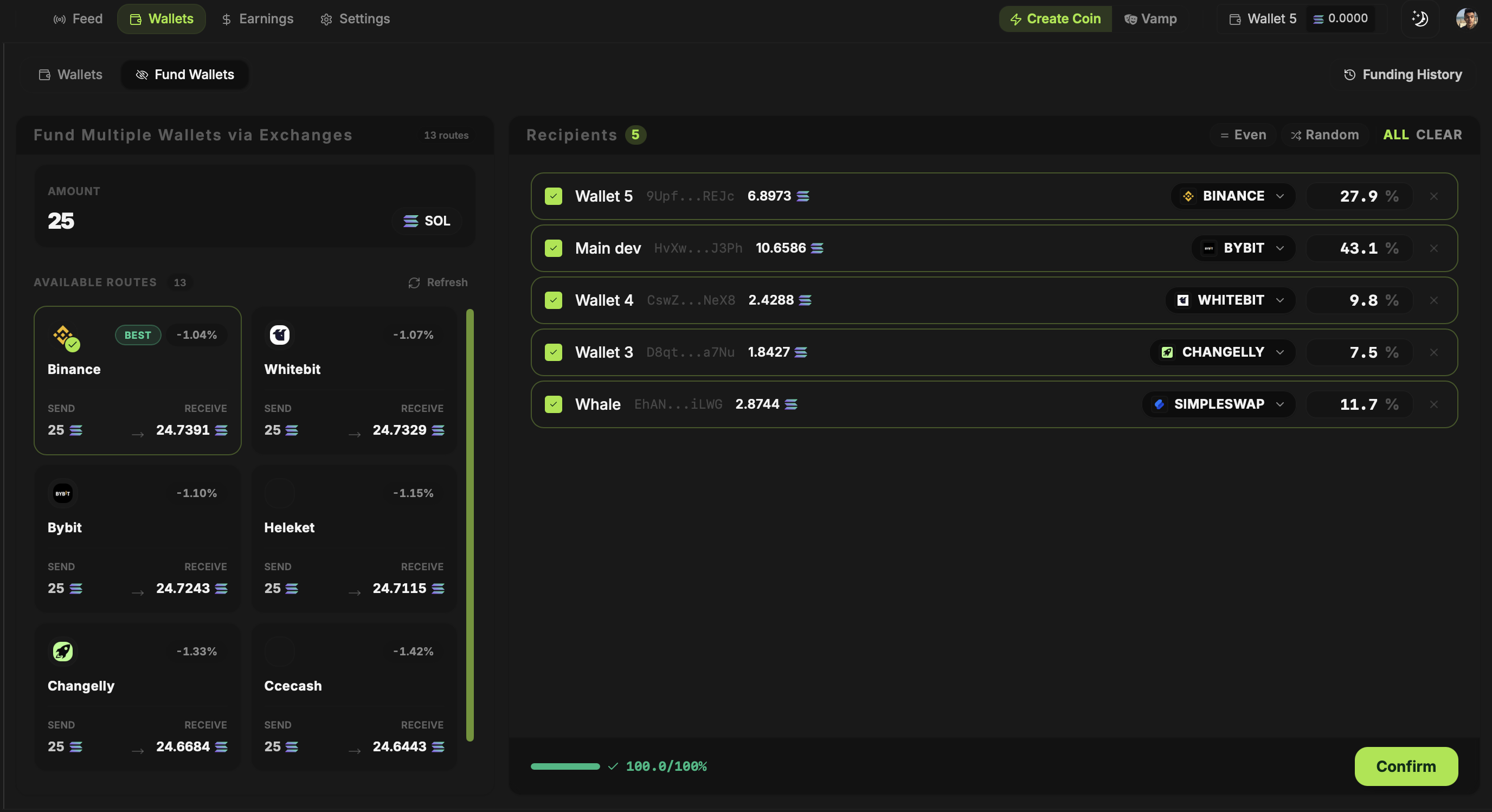
The Fund Wallets screen lets you spread SOL across selected Deployer wallets in one flow. It compares routes through supported exchanges and swap services, then shows the estimated amount each wallet will receive.
Updated
Choose recipients and an amount
Open Wallets, then Fund Wallets. Enter the total amount and select the wallets to fund. Choose an even split or adjust the percentages for individual recipients. The recipient list shows the address, allocation and estimated SOL for each wallet.
Compare the routes
Available providers can include Binance, Bybit, KuCoin and swap services. Choose a route for each wallet and read its quoted fees and expected output before confirming. Quotes change; the amount shown while planning may differ from the final amount received.
Check the result before trading
Confirm the destination addresses and allocations, then wait for the transfers to finish. Verify the resulting balances in Wallets before you enable a bundle buy or snipe. Routing through an exchange does not make a wallet anonymous or guarantee that its relationship to other wallets cannot be inferred.