Documentation
Configure Snipe buys after launch
Snipe is separate from Bundle. It places selected wallet buys after the launch, aiming for the next one or two blocks. The order can be beaten by other transactions, so treat the timing as a target rather than a guarantee.
Updated
Set the wallets and amounts
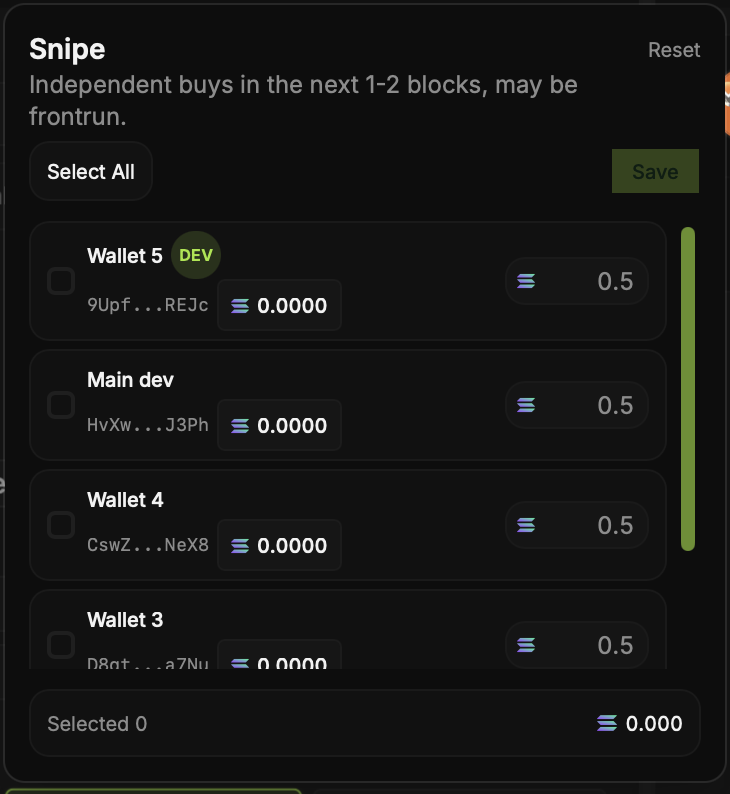
Turn on Snipe in Create Coin and open the settings. Select wallets and enter the buy amount for each. The selector totals the planned buys so you can spot a misplaced decimal before saving.
Fund and review
Each selected wallet needs funds for its buy and transaction costs. Check balances in Wallets, then review Snipe alongside any Bundle settings before deployment. The two options can cause the same wallet to spend more than you first planned.
Check execution afterward
Open the Trade Panel or a Solana explorer to see which buys confirmed and at what price. Snipe does not guarantee that your buys will be first, that they will all fill, or that the token will gain value.